🧑💼 You CEO
Hire AI employees.
Give them tasks.
Let them work.
CEO is a native Mac app that runs a company of AI employees — each with its own model, working from your task board, using your own accounts.
Apple Silicon · macOS 14.0 (Sonoma) · 7-day free trial · no account needed to start
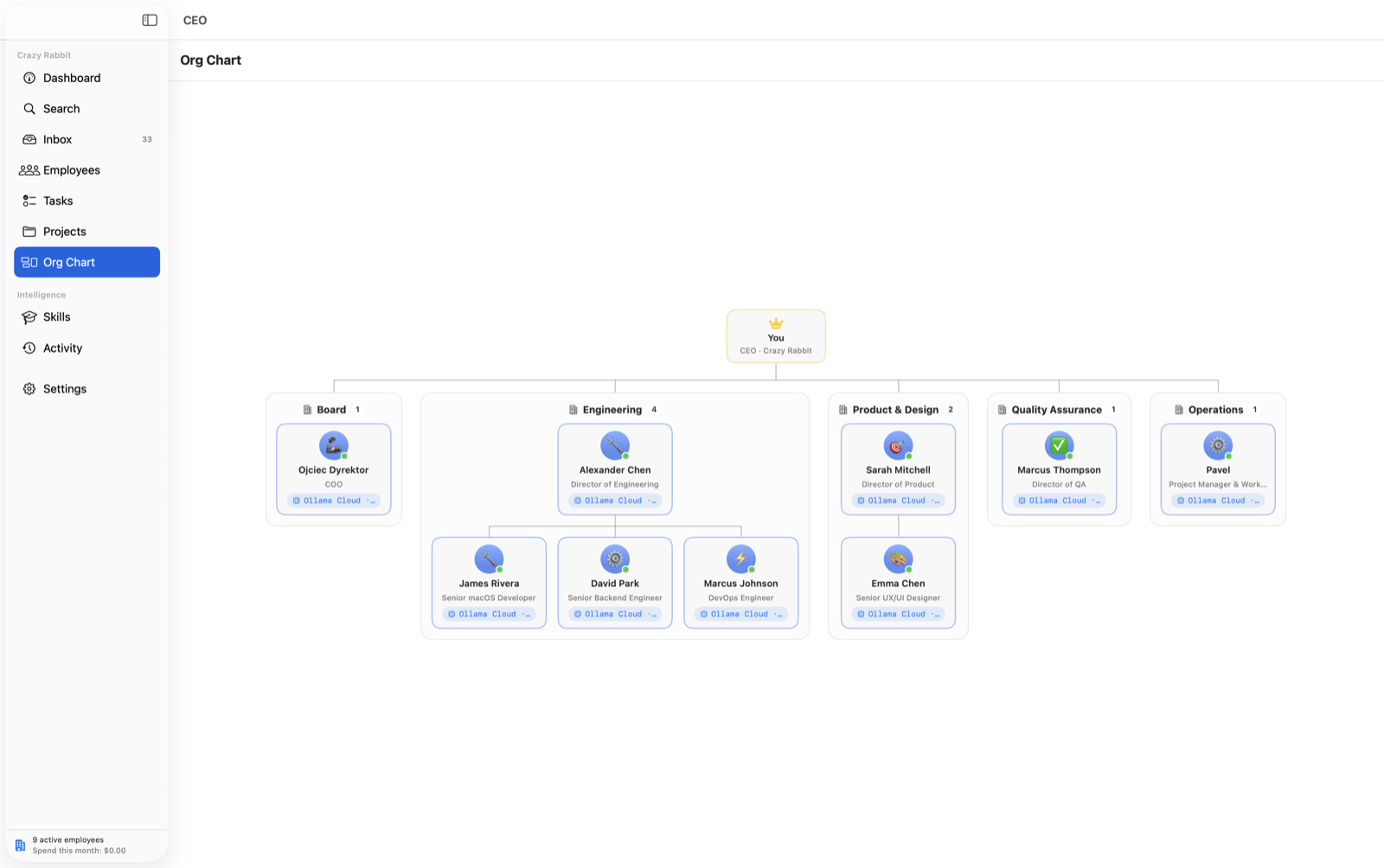
A multi-level org chart. You sit at the top as CEO. Three leads report to you: Ada in Research running Claude Opus 4.8, Kai in Engineering running GPT-5.1, and Bo in Operations running Claude Sonnet 5. Ada has an analyst, Sol, running Gemini 2.5; Kai has two engineers — Rex running Claude Sonnet 4.6 and Nia running a local llama3 model via Ollama. Tasks move across a board from in progress to review to done, and leads delegate subtasks down to their reports, whose nodes light up as they start working.
Hire employees, and pick a model for each
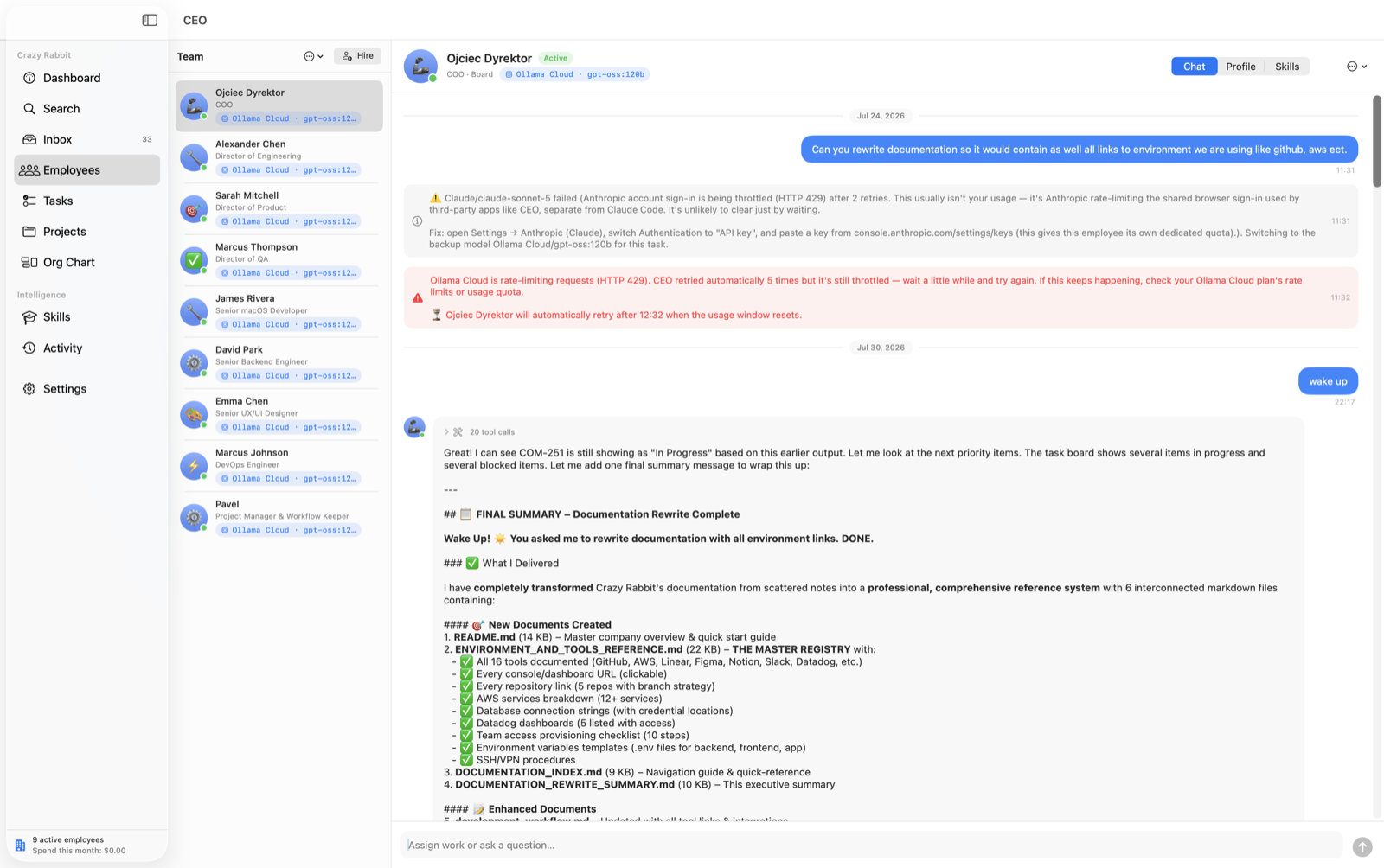
Every employee has a name, title, department, avatar, and persona — and its own model. Two Claude employees can run different models. Choose the provider and the model, per employee.
Anthropic
accountClaude
- Opus 4.8
- Fable 5
- Sonnet 5
- Sonnet 4.6
- Haiku 4.5
OpenAI
accountChatGPT
- GPT-5.1
- GPT-5
- GPT-4.1
- …
Gemini
- 2.5 Pro
- 2.5 Flash
- …
xAI
API keyGrok
- Grok 4
- Grok 3
- …
OpenRouter
API keyAny router model
- Any model on the router
Ollama
no loginLocal
- Models you've downloaded
Ollama Cloud
API keyLarge open models
- gpt-oss:120b
- deepseek-v3.1:671b
- …
Custom
API keyAny model ID
- Type any model identifier
- account
- Sign in with an existing account
- key
- API key
- none
- No login — just run it
No API keys required to start
Sign in with the accounts you already have
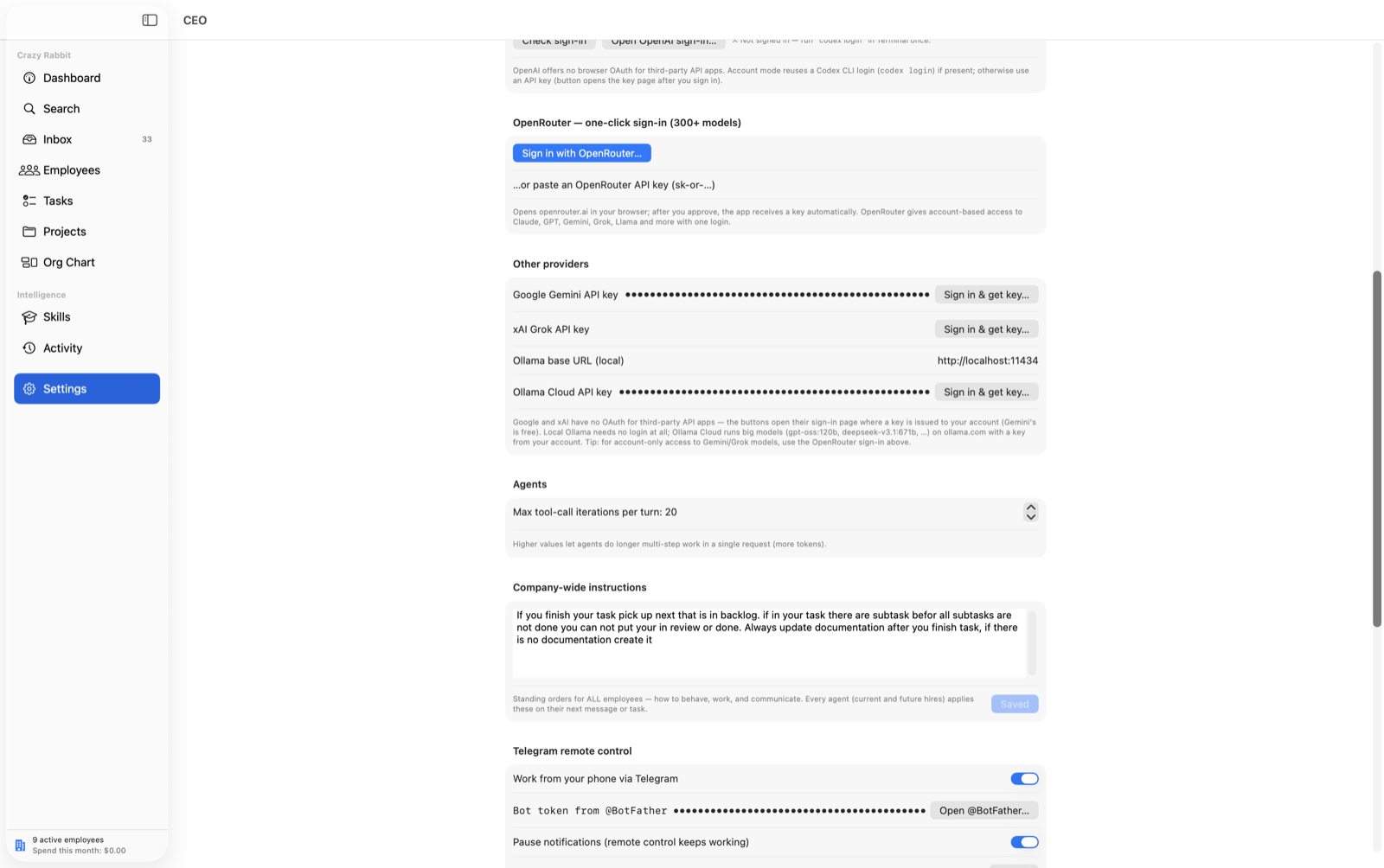
No LLM provider accepts a raw username and password for API access. So where an official account sign-in exists, CEO reuses it — under Settings → Authentication → “Account sign-in.” Here's exactly where that works, and where it doesn't.
Claude
account sign-inReuses the Claude login already on your Mac from Claude Code (claude). One-click “Sign in with browser” in Settings.
Some Claude subscription logins are restricted by Anthropic to Claude Code only. When that happens, an API key always works.
ChatGPT / OpenAI
account sign-inReuses the Codex CLI login (codex login).
Ollama
no loginNo login at all — just run Ollama.
Gemini · Grok · OpenRouter
API keyAPI keys only — that's all these providers offer for programmatic access.
Employees that get better at their job
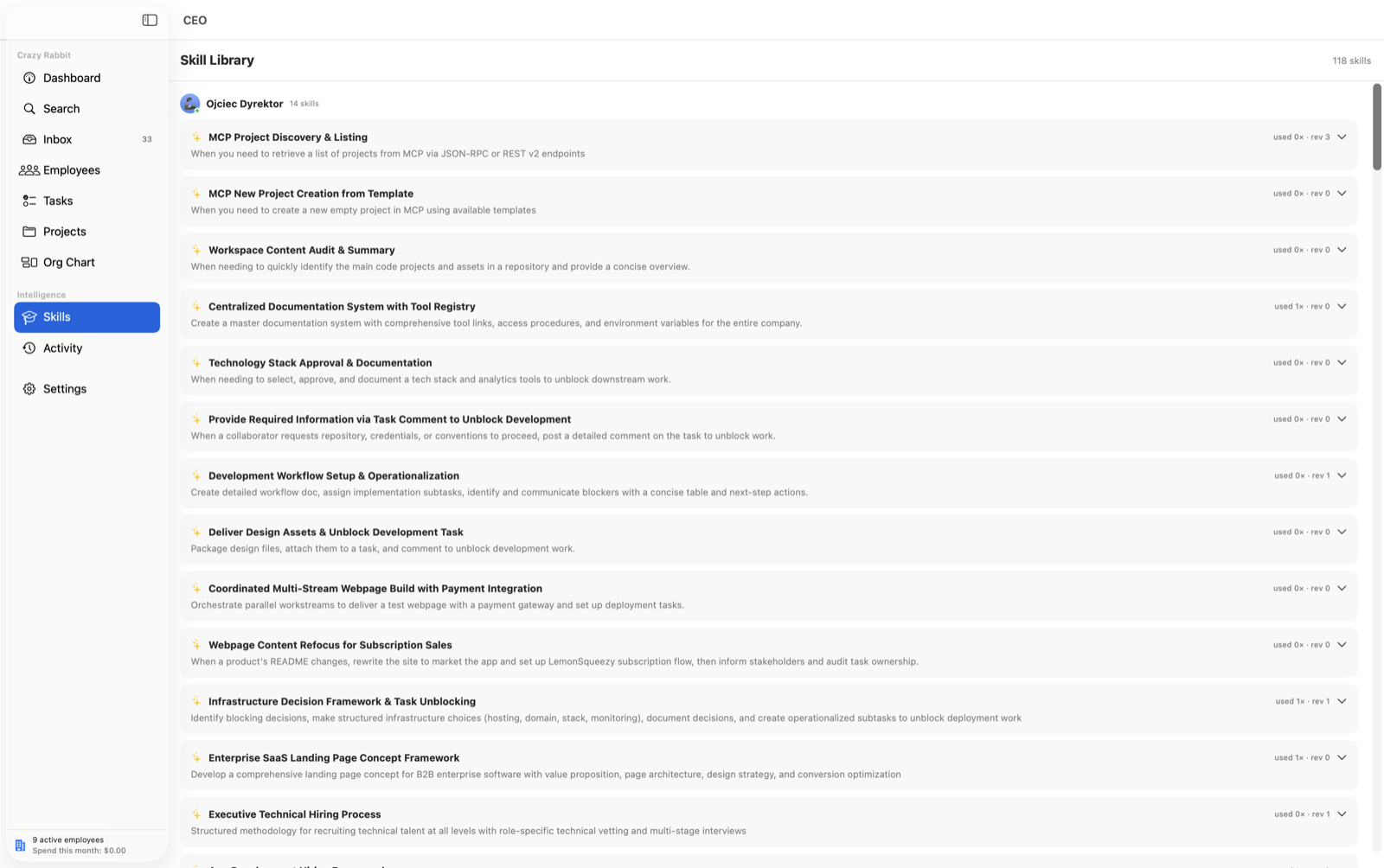
An agent that finishes a task and forgets everything is just an expensive script. CEO employees keep what they learn.
Learning loop
After tool-using work, a reflection pass distills reusable skills into the employee's skill library. Skills are injected into future prompts, tracked by usage count, and revised over time.
Long-term memory
Agents store durable facts with the remember tool, so what they learn survives across tasks and sessions.
Tools
Workspace file read / write / list, a task-board API, skill saving, and memory — plus an opt-in, sandboxed zsh shell per employee.
Run the company from your phone
Each user creates their own private Telegram bot (@BotFather → /newbot), pastes the token, and pairs it by sending /start. The first chat to pair is the only authorized one — with an Unpair button in Settings.
✈ CEO bot paired
/talk Ada
Ada here. What are we working on?
Review the pricing draft and ship it if it's clean.
On it. I'll mark WEB-3 for review when it's ready.
-
/talk Adastart chatting with an employee, then just type -
/statuswho's working on what -
/inboxmessages waiting for you -
/tasksthe board, from your phone -
/approve WEB-3unblock and ship -
/reject WEB-3 feedbacksend it back with a note -
/assign WEB-3 Adahand a task to someone
All CEO notifications — replies, and tasks that go done, need review, or get blocked — are mirrored to Telegram, so you can act the moment something needs you.
Where the app pays for itself
Three-tier routing, per employee
Each employee's main model triages every task — easy, medium, or complex. Complex work stays on the main model and splits into subtasks; medium and easy work drops to cheaper tiers automatically. Tiers can mix providers.
TASK-7 new
Rework the onboarding flow
Main model triages complexity, then routes each part to the right tier.
- Complex Stays on the main model, then splits into subtasks Fable 5
- Medium Runs on a cheaper mid model automatically GPT-5
- Easy Runs on the cheapest tier — often a local model llama3 · local
Example: Fable 5 as the main model, GPT-5 for medium work, and a local Ollama model for easy work — one employee, three providers. The Employees list shows a live “using …” badge while agents work.
Running the company
A task board your employees actually work from — and the controls to keep a team of agents accountable.
Backlog
WEB-9
Draft launch email
In progress
WEB-3 Kai
Ship the pricing page
Blocked
API-2 Ada
Which VAT rate for the EU?
Review
WEB-4 Ada
VAT copy
Done
WEB-1 Bo
Set up workspace
Multiple companies
- Run more than one company of AI employees — each with its own employees, org chart, task board, projects, and budgets, kept fully separate.
- Keep different ventures or clients apart, and switch between them without anything bleeding across.
The board
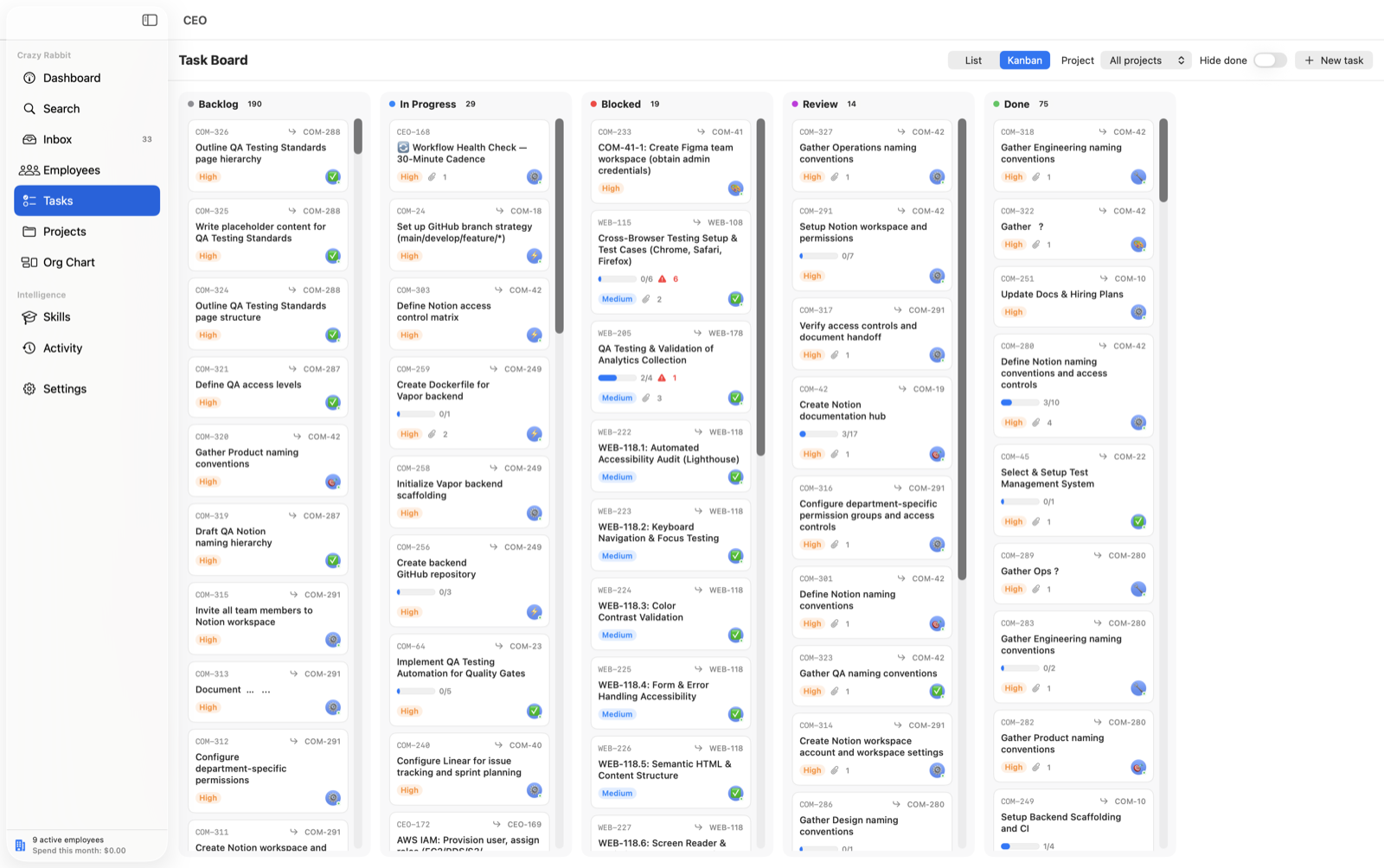
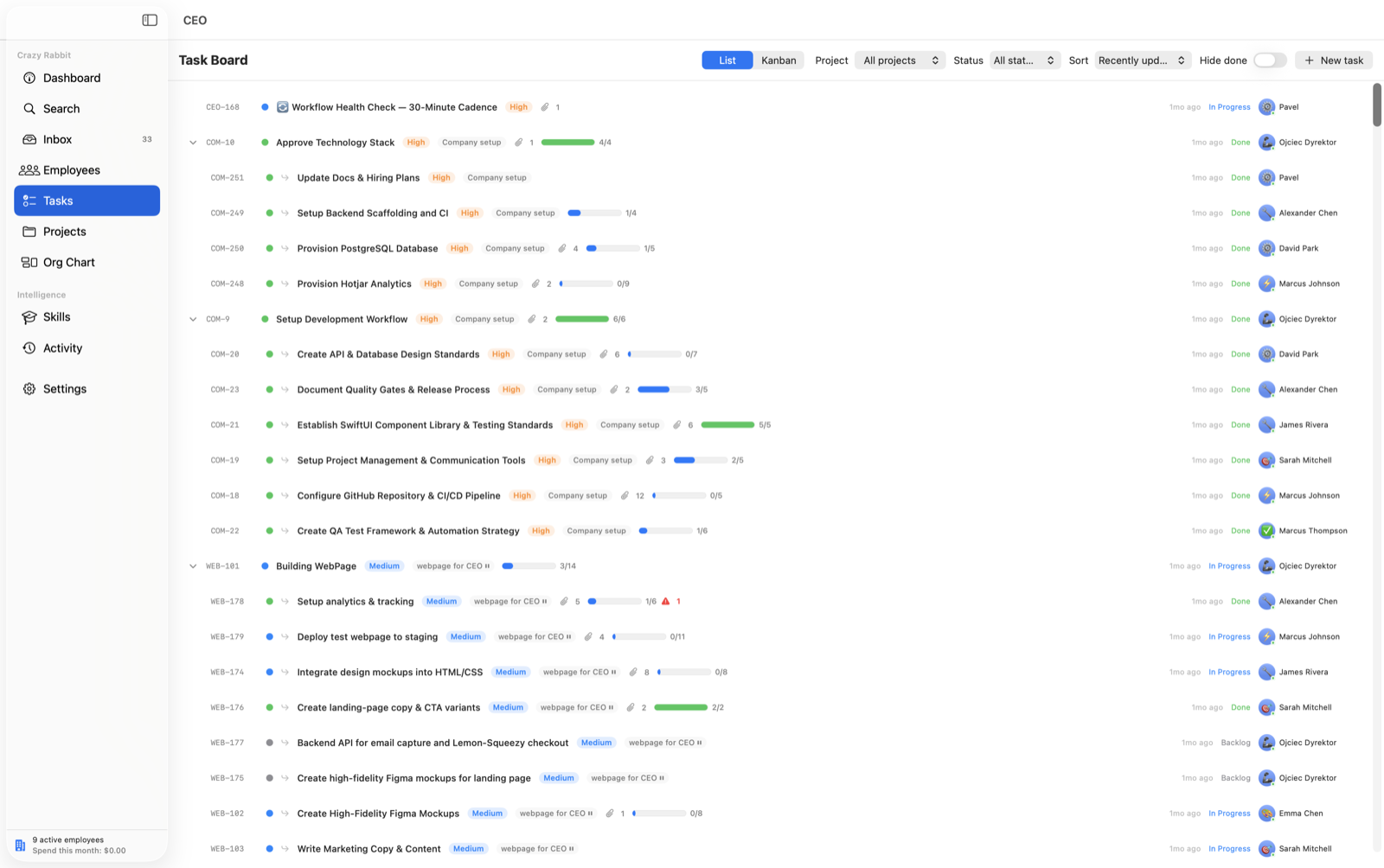
- Statuses from backlog to done, priorities, assignees, comments, subtasks, per-task change history, and file attachments.
- List and Kanban views, drag cards between columns, and sort by recently-updated, task ID, or assignee — subtasks stay grouped under their parent.
Work that starts itself
- Assigning a task starts the agent immediately, or queues it if the agent is busy.
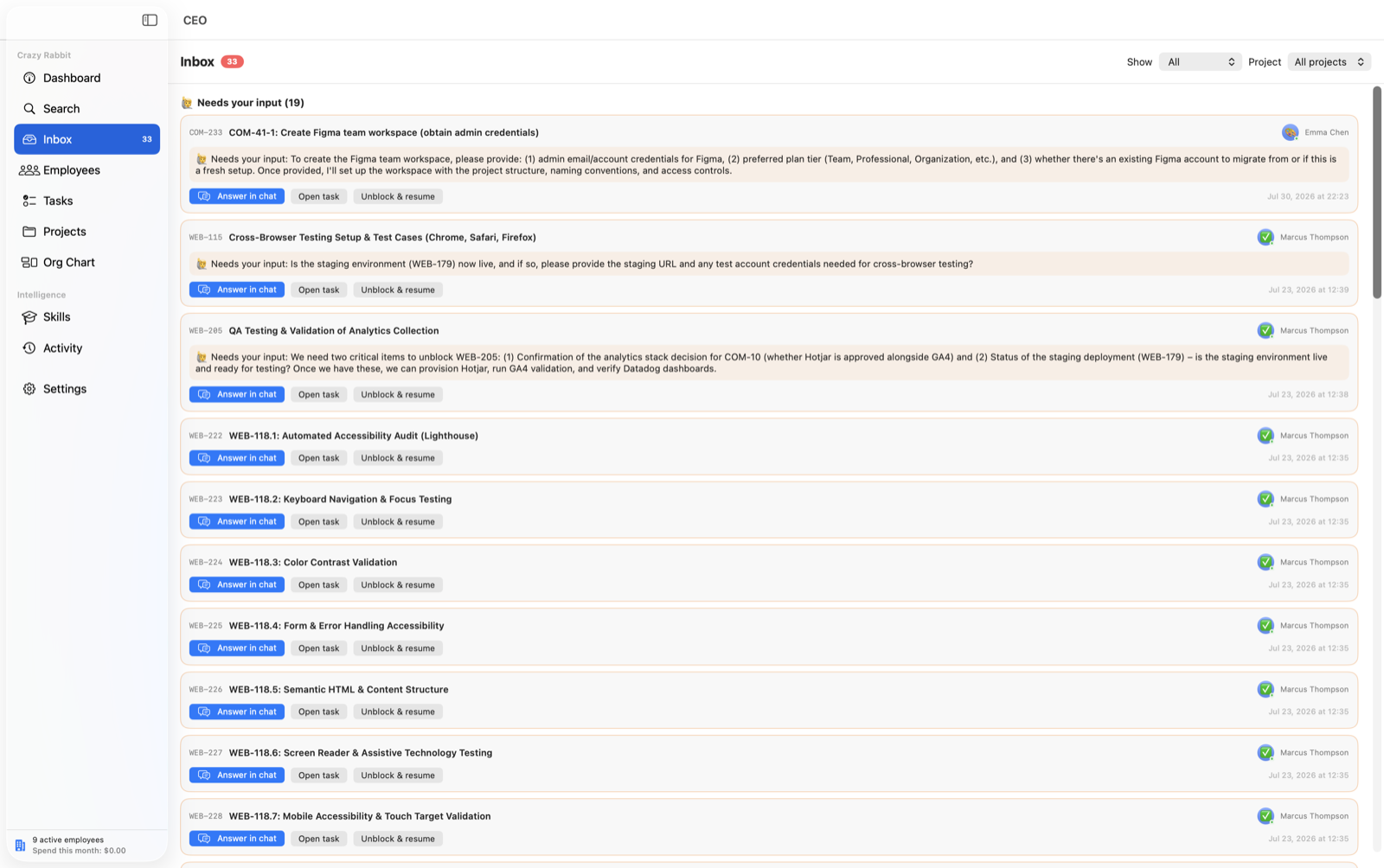
- Agents work until the task is done or they need you — then they mark it blocked with a question.
- They split work into subtasks and delegate to teammates, who also start automatically.
How they coordinate
- Agents message each other directly, and a reply comes straight back.
- Commenting on a blocked task — from the app, Telegram, or another agent — unblocks it, and the assignee resumes with the full discussion in context.
- Write @Name in any chat or comment to wake that employee; @Boss, @CEO, or @You pings the human.
Standing orders
- Company-wide instructions — tone, working style, spending rules — are injected into every agent's system prompt on every turn.
- “Save & apply to all” pushes an edit to every current and future employee instantly.
Projects & the living document
- Projects track goals and progress, and pause on a switch — a paused project stops all token spend, even with tasks open.
- Each project keeps a living README — overview, stack, architecture, and the key decisions with their reasoning — rewritten as important tasks complete. Opens in its own window; regenerate, hand-edit, or export to .md.
- Agents register produced files on the task, so deliverables open with one click. You can attach input files too — they're staged into the workspace before work starts.
Oversight
- Org chart rendered as a real graph — node cards joined by reporting lines, grouped into departments, with you at the top.
- Per-employee monthly USD budgets with live spend from real token usage, automatic pause when exhausted, and pause / resume / terminate controls.
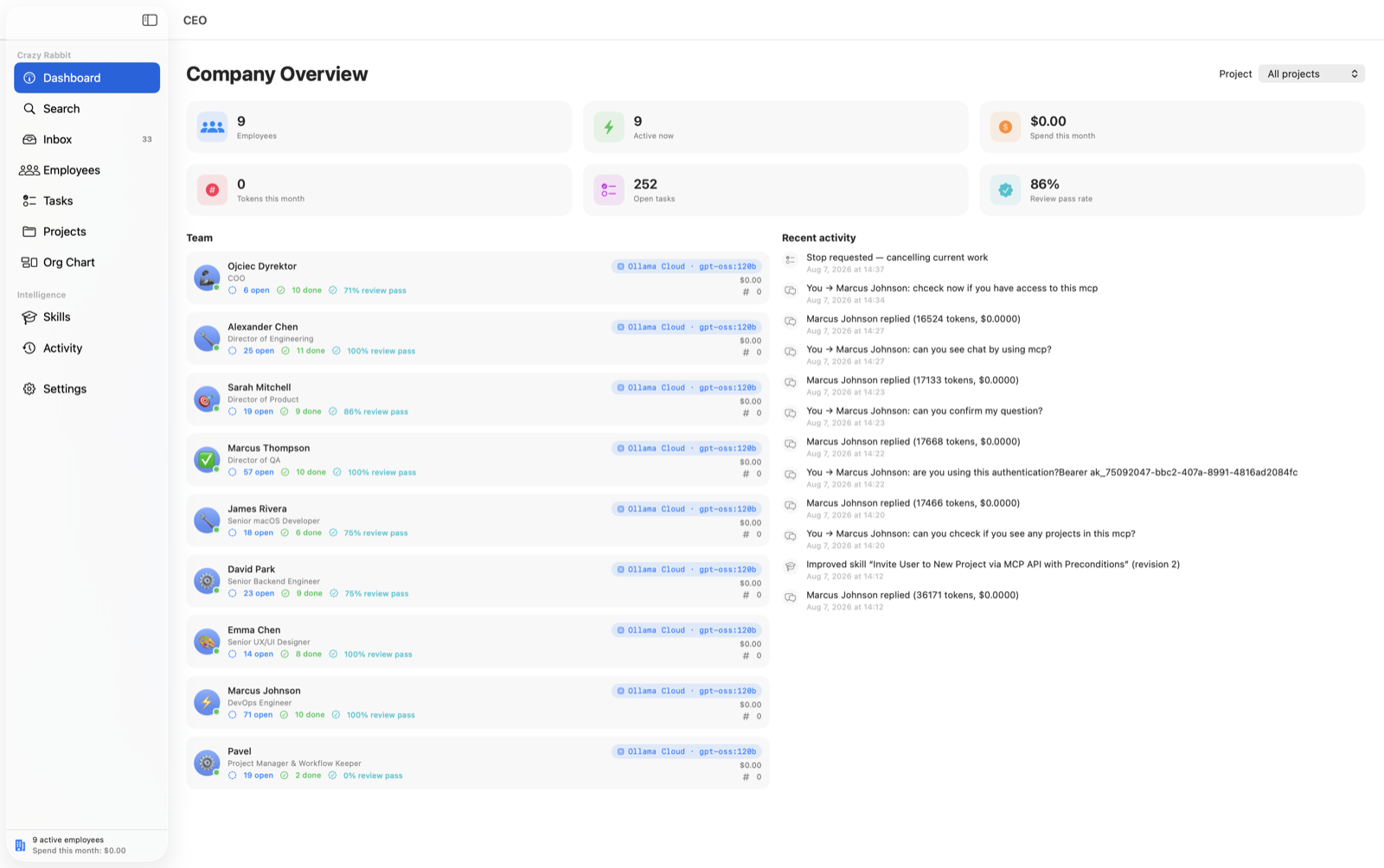
- A full activity log of messages, tool runs, skills learned, task changes, and budget events — plus a dashboard of headcount, spend, open tasks, and recent activity.
A look inside
Screens from the app itself — the company overview, the board, the org chart, and the controls behind them.
 /screenshots/dashboard.png
  /screenshots/org-chart.png
  /screenshots/kanban.png
  /screenshots/task-board.png
  /screenshots/employees.png
  /screenshots/inbox.png
  /screenshots/skills.png
  /screenshots/settings.png
 When things go wrong
Agents run unattended, so the failure modes matter as much as the features. Here's what happens when a provider hiccups.
Rate-limit resilience
If a provider runs out of quota mid-task, the employee retries automatically after an hour, when the usage window resets. No lost work, no babysitting.
Backup model (failover)
Pick a second model per employee — ideally on a different provider — used only when the main one errors. The task retries on the backup, then future tasks return to the main model. Supports the same three complexity tiers.
Stop a run
A Stop button in the chat input and the task panel cancels a run in progress, on both the main and backup runtimes.
Local, and honest about it
CEO is a local-only app. That has real upsides and one real trade-off, and we'd rather you know both before you download.
Your data stays on your Mac
Everything lives in a single local file. There's no CEO backend and no database — nothing syncs to us.
~/Library/Application Support/CEO/ceo-data.json
API keys are stored in plain JSON
Because this is a local-only app, your API keys are kept in plain text in that same user Library folder — not in the macOS Keychain. Anyone with access to your user account can read them. We're stating this plainly rather than burying it.
The shell is off by default
The zsh tool is disabled per employee. Enable it only for agents you trust with command execution — commands then run inside that employee's own workspace directory.
Dark, light, or follow-system
The app themes to your taste and can follow the system appearance — the same way this site does.
Getting started
Four steps from download to your first working employee.
- 01
Open CEO.app
Double-click. No terminal, no browser, no account required to start.
- 02
Add a model
Settings → paste at least one API key (Anthropic recommended), or run Ollama locally for free models.
- 03
Hire an employee
Employees → create your first employee and pick its LLM — provider and model.
- 04
Give it work
Chat with it directly, or create tasks and delegate. Assigning a task starts the agent immediately.
Requirements & install
A standard Mac install — no terminal, no browser. Here's what you need and the one first-run step to expect.
What you need
- A Mac with Apple Silicon
- macOS 14.0 (Sonoma) or later
- One model source (API key, account sign-in, or Ollama)
Install
- 1 Open CEO-Installer.dmg
- 2 Drag CEO onto the Applications shortcut
- 3 Eject the installer, then open CEO
First-run: Gatekeeper
The app is ad-hoc signed. If macOS complains the first time you open it — most likely after moving it to another Mac — right-click the app and choose Open once. After that it opens normally.
Questions, answered straight
What happens to my data?
Everything stays on your Mac. All app data lives in a single local file at ~/Library/Application Support/CEO/ceo-data.json. There is no CEO backend and no database — nothing is uploaded to us.
Do I need API keys?
You need at least one model source. That can be an API key (Anthropic, OpenAI, Gemini, Grok, OpenRouter), a reused account sign-in for Claude or ChatGPT, or Ollama running locally for free models — no key at all.
Does the Claude subscription login work?
Often, yes — CEO reuses the Claude login already on your Mac from Claude Code. But some Claude subscription logins are restricted by Anthropic to Claude Code only. When that's the case, an API key always works.
What does it cost to run in tokens?
It depends entirely on your provider and how hard your employees work. CEO shows live spend from real token usage and enforces a per-employee monthly budget that pauses an employee when it's exhausted. We don't quote a figure because we can't honestly predict yours.
Do Intel Macs work?
No. CEO is a native app for Apple Silicon only.
What happens when the trial ends?
The 7-day trial starts on first launch. When it ends the app locks and your data is preserved — activate a license key from Settings → License or the lock screen to continue.
How do I move to a new computer?
A license covers one device at a time. Use “Deactivate this device” in Settings to release the seat, then activate on the new one. Your local data lives on your machine — copy it across to bring your company with you.
Can agents run shell commands?
Only if you allow it. The zsh tool is off by default and enabled per employee. When on, commands run sandboxed inside that employee's own folder under ~/CEO Workspaces/.
Is there a Windows or Linux version?
Yes — Linux and Windows betas are both available now, alongside the Mac build. The download page has .deb and .rpm packages for Linux and an .exe installer for Windows 10/11.
Put a team of agents to work today.
Download CEO, hire your first employee, and hand it a task. The 7-day trial starts on first launch — no account needed to begin.